Time Machine
When syncing or overwriting bookmarks, the biggest concern is data loss. BookmarkHub introduces the Time Machine feature, elevating simple “data synchronization” to the level of “version control”, providing you with a highly secure data protection experience.
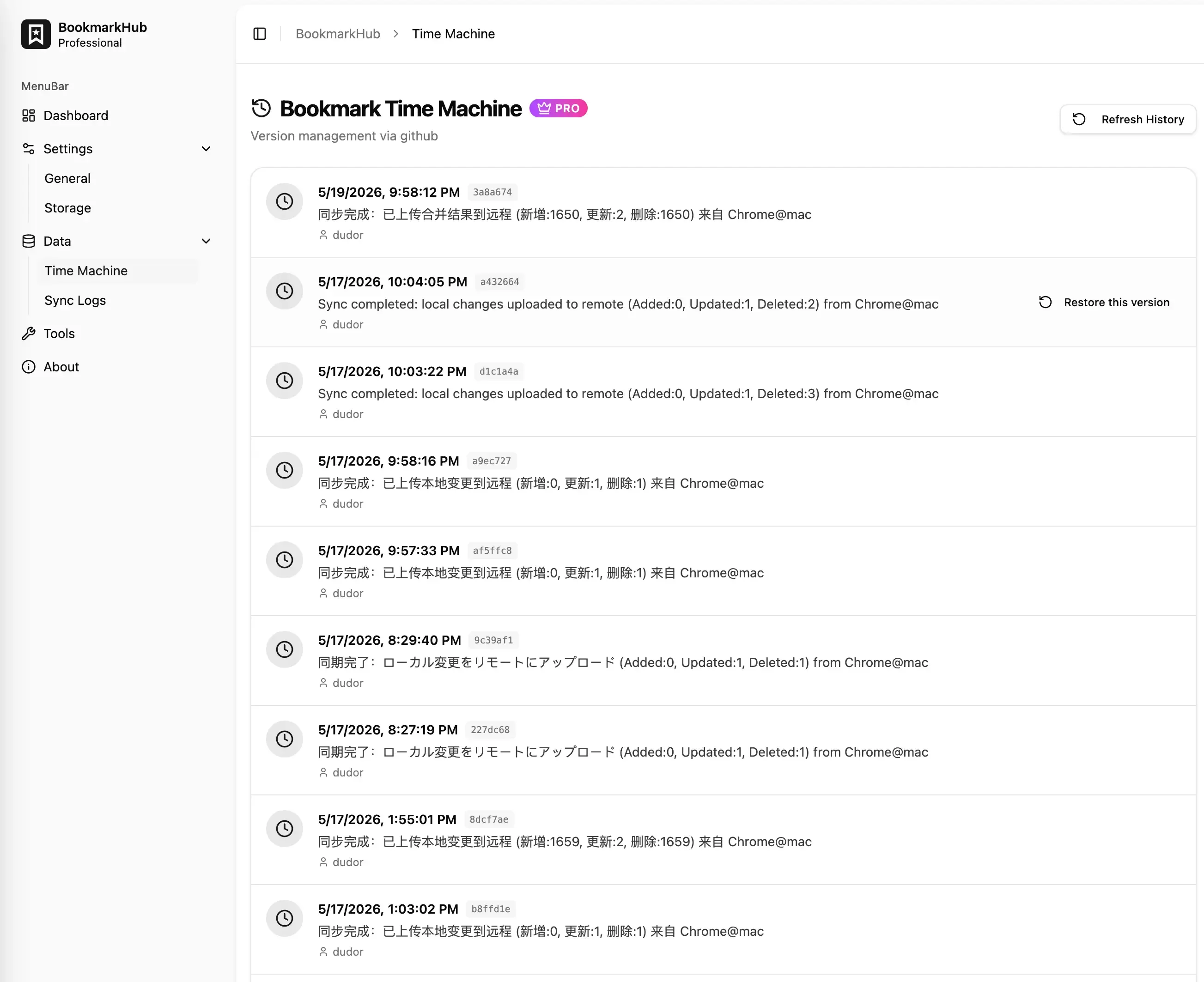
Time Machine is an advanced feature exclusive to Pro members. It leverages the native version management capabilities of cloud storage backends to ensure your data is secure and traceable at every moment.
How it Works
Section titled “How it Works”Unlike traditional local snapshots, BookmarkHub’s Time Machine deeply integrates the Git features of its storage backends (such as GitHub, Gist, Gitee, and GitLab):
- Cloud Versioning: Every time you perform a “Push” or trigger an automatic sync, the system generates a unique Commit in the cloud.
- Full Backup: Each version stores the complete bookmark tree structure as it existed at that time, rather than just incremental differences.
- Seamless Recording: You don’t need extra steps; Time Machine silently maintains this bookmark evolution timeline for you behind the scenes.
Core Advantages
Section titled “Core Advantages”- Cross-device Retrieval: Since version records are persisted in the cloud, you can retrieve bookmarks from days ago synced on other computers from any device with BookmarkHub installed.
- “Regret Medicine” for Mistakes: If you accidentally delete a large number of bookmarks and mistakenly sync them to the cloud, Time Machine allows you to instantly roll back to any previous healthy state.
- Transparent Traceability: Each historical point is clearly marked with a timestamp, Commit ID, and commit message, keeping you fully informed of data changes.
Operation Guide
Section titled “Operation Guide”- Enter Time Machine: Open the extension’s Settings (Options) page and click Time Machine in the left sidebar.
- Pull Records: The system will automatically connect to your cloud storage, reading and displaying a version list sorted in reverse chronological order.
- Identify Versions: Locate the specific moment you want to roll back to using the sync time or Commit ID.
- One-click Restore: Click the “Restore” button. BookmarkHub will download the full data for that version from the cloud and safely overwrite your current browser bookmarks.
Supported Storage Backends
Section titled “Supported Storage Backends”Time Machine relies on storage services with robust version management capabilities. It currently fully supports:
- GitHub / GitHub Gist (Recommended)
- Gitee
- GitLab
- OneDrive (Leveraging file version history features)