Popup Panel
BookmarkHub provides an intuitive and lightweight main control panel (Popup), which pops up when you click the extension icon in the top right corner of your browser.
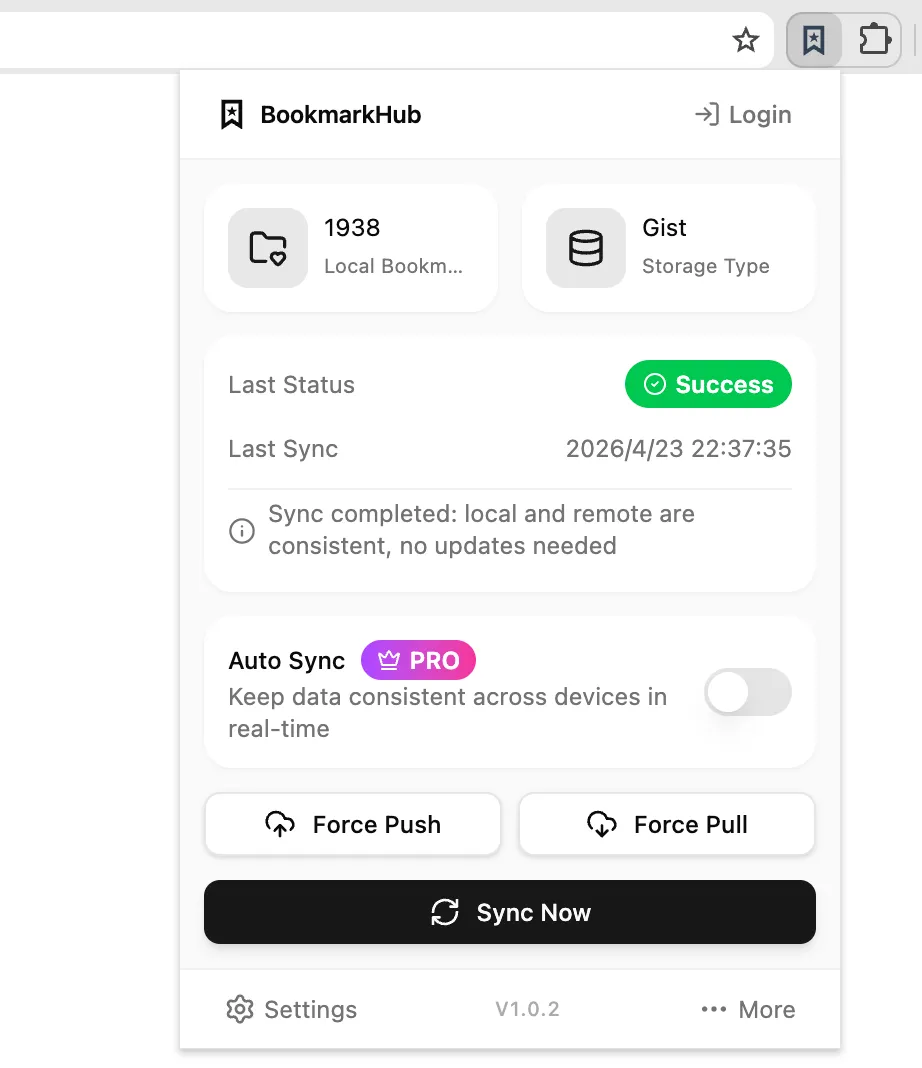
Core Status & Statistics
Section titled “Core Status & Statistics”The main panel displays key data and status information about your bookmark library:
- Local Bookmark Info: Shows the number of bookmark items currently in your browser.
- Storage Method: Displays the storage service currently connected (e.g., GitHub, Gitee, WebDAV, OneDrive, Google Drive).
- Last Sync Status: Clearly displays the final status of the last synchronization (Success, Merging, Failed) and the sync time.
- Auto Sync: Shows whether the auto-sync function is currently enabled. Once enabled, the extension will automatically sync in the background at your specified interval.
Action Buttons
Section titled “Action Buttons”- Sync Now: This is the most common button. Clicking it immediately triggers a comparison and merging of local and cloud bookmark data.
- Upload to Cloud (Force Push): Directly uploads all current local content to the cloud, overwriting the latest versions in the cloud. Use this when you are certain your local data is the absolute source of truth.
- Download from Cloud (Force Pull): Discards local changes and overwrites your local browser with the latest cloud bookmarks. Use this function for new installations or to recover bookmarks if local data is lost.
Quick Menu
Section titled “Quick Menu”The bottom bar of the panel provides quick access to the Settings page. You can also open the More menu to access feedback, support options, the official website, community links, and support portals.